WSUS – Windows 10 Fall Creators Update quirks [EN]

After posting about my experience updating Windows 10 to Creators Update via WSUS earlier this year i thought updating to Fall Creators Update should be a breeze. Well, not exactly. There are some issues and quirks i had to deal with.

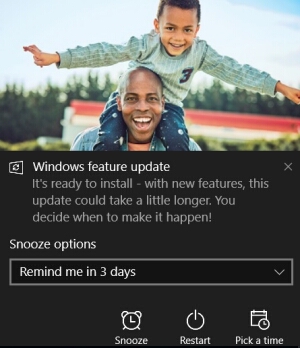
First of all, our WSUS has successfully pulled Fall Creators Update (1709 version) from Microsoft servers sometime around October 17 and started reporting Needed status for Windows 10 PCs in our network. So i went and declined an upgrade for Windows 7 and 8.1 machines as we are not doing such upgrades. And then approved en_us and en_gb updates for a special group, which i will be putting PCs in to update. We have two versions as there are a few computers in the network using en_gb version (that was a mistake, but now we don’t really want to reinstall them; i wish there were only one EN version..). Then i have added a few testing PCs to that group. When doing Check for updates it pulled the update from WSUS and started preparing it for installation. While PC was showing “Preparing” status, WSUS was showing Failed status for this machine (quirk No.1, but very minor one). After the update installation it still shows Needed status for some time, until it gets new info from PCs. Once PC has prepared Fall Creators Update (FCU or 1709) it shows a popup as shown above. It is different from what was shown last time and this popup is the usual Action Center popup. Although i would like not to have human faces in there as i have to prepare instructions with screenshots and this looks weird. Quirks No.2 and 3 – pressing Restart Now in this popup did nothing on one of my testing machines. I have waited 5 minutes, tried pressing it again, restarting the machine and pressing again. Nothing. The second PC haven’t even showed it at all for some reason. One should hope MS will fix this for the next update (actually, it should be fixed in the FCU already for it to work for the next update). So, i had to use Start > Power button > Update and Restart. This worked fine and FCU install went smoothly on both machines. It took around 10-15 minutes until seeing your desktop (with multiple reboots and waiting for it to finish once you login). As MS is now doing updates with only differences, not overwriting the whole system, it takes almost 2 times less time. This is great.

Read More

Board Game Review – Imhotep [EN]

Wanted to try this game since it was nominated for the Essen Spiel awards. I also like some of the other designer’s Phil Walker-Harding games (Sushi Go!, Cacao). First suspicion appeared after watching people playing it on video. Recently this game has been added to Yucata library, so i rushed to try it out. And, sadly, confirmed my doubts. Although the game has some interesting mechanisms, as when players in order put cubes on boats and then one of the players decide where to sail one boat. Although every points generating board has two sides and provides some replay value. And the game is oriented to families based on its weight. All in all it lacks long term strategy planning and even ability to have some short term tactic. Because there is very little control of what is happening every turn. It is hard to explain with words. This is better seen when playing it. Say you want to add a few cubes in a row to one scoring board. You put one cube on some boat, but on the other player’s turn anything can happen. He may add his cube right after yours or sail the boat or anything else. There are special cards that lets you play around this a bit, but to get them you have to spend cubes and sail a boat to the place with them and someone can beat you to that and sail the boat first to gain the right to pick cards first. Although many games doesn’t have an absolute control, this one has too little of it for my liking. I have only played it with two players, but i somehow feel it should be even more chaotic with more players. Maybe this game is better suited for family play evenings or playing during a party not paying attention to strategy or tactics. But this is not what i like in games usually. 6/10

Board Game Review – Firenze [EN]

This time i won’t be talking about a new game for me. As i’ve been playing Firenze for a while. But i think it is worth mentioning. This is one of my all time favorite games. And it’s main quality is variability. Although the main thing you do in this game is building towers, but there are a lot of choices. Whether to build a lot of smaller towers or build less, but taller towers granting more points, or maybe trying to fulfill tasks on various cards or just building enough to capture all the “bonus balconies”. There are also lots of various useful cards that make it easier to build towers, help avoid negative points or.. lets you harm your opponents. yeah, that’s one of the rare euro style games with players confrontation. Although, nothing ground braking. Usually you can only remove one brick from someone’s tower or steal one brick from other player’s storage. But sometimes one such move can lead to a complete destruction of a long honed tower. Though, one can argue that it would be more a fault of a tower owner as he didn’t pay attention to the situation and took  a risk. And it leads to a one slight negative of this game. I have understood this while attempting to teach a new player. It is hard to wrap your head around all the nuances and options in this game and it can be overwhelming. It probably could take around 5 games to fully understand all the strategies, to see all possible risks and options, when a player starts to think few turns ahead. And then full potential and beauty of this game should become clear. Firenze is using an interesting mechanism for cards drafting, which can be seen in some other games. It costs nothing to pick first card in a row. But to take cards further on the row you have to pay. And to pay with the same bricks you use to build towers. The game is also not very long. Although i mainly play it with two, it also plays very fast with 3. But i have never tried it with the maximum of 4 and somehow feel it would be a bit too chaotic for my taste. It would be hard to follow some strategy. Although i have only played it in the electronic form (Yucata), its physical version looks beautiful with all the 3D towers players are building with little bricks. Unfortunately this game has been long out of print and it is nearly impossible to find it in the stores and for a reasonable price. Yucata implementation of this game is clear and convenient, although one would have to get accustomed with a bit confusing turns structure. 9/10

Another year :) [LT-EN]

[LT] Šian sukako antri metai mano blogui. Nusprendžiau kažkokią suvestinę daryt metų gale, taigi jokios statistikos šį kart nepateiksiu. Galima pasakyt tik tiek, kad blogas pasuko šiek tiek kita linkme ir dabar daugiau rašau apie technologijas. Bet apie tai detaliau kitą kartą. O kol kas su gimtadieniu 🙂

[EN] Today it’s two years since the start of this blog. I have decided to do some kind of summary at the end of the year. So not much to say now. Just that the blog has become more about technology stuff. But in more details about that later. And for now – Happy Birthday 🙂

Share Workbook and Tracking changes removed from Excel [EN]

That’s not exactly my usual tip article for Office 365, but i thought i should still share this information. In July Office 365 client (MS Office suite) in the Current Channel has been updated. They have added a realtime collaboration feature (as well as AutoSave) to Excel application. This made possible to work with Excel document the same way as it was possible in Word before. Although a number of conditions must apply. First the file should be stored in OneDrive or SharePoint Online. And you also has to access it via a browser and then select to edit it in MS Excel. Opening a file from your OneDrive folder on your PC doesn’t activate those features. That’s all cool and dandy (although while trying it in Word we have found that it often doesn’t work that well). But this also gave the reason for MS to remove older features like Share Workbook and Tracking changes from the Office Ribbon in Excel. These features allowed to get a somewhat similar (although not realtime) results, but when files are stored on a Windows share or sent via email. In our company we are still heavily using Share Workbook feature, so it was an annoying thing to find out. Fortunately MS wasn’t dumb enough to completely remove them. One can still find these buttons in File > Options > Customize Ribbon > All Commands and add them to a custom tools group (you can create that group in the same place these buttons were before). The buttons have “(Legacy)” label attached to them. So this explains MS’s thinking to retire these features in favor of the new ones, which encourage to use their cloud services even more.

Office 365 – Skype for Business not so “Smart Contact” [EN]

After using XMPP (“Jabber”) for 15+ years it is sometimes hard to wrap around some principles Microsoft communication tools work. We were used to have full control of our users contact lists. This meant every user had a list of groups with contacts (we usually had all the employees there divided into departments). When someone would leave the company, switch departments, change the name, we (admins) would change that and it would automatically appear for everyone. Now, with Skype you don’t have that. The idea is you should know better who you need to have on your contacts and you should search and add them yourself. I can see some sense in that. You probably don’t need every coworker there, but users are lazy, new employees wouldn’t know whom to add, etc. There could be an option to do one way or another. But there is none.

Read More

Office 365 – Changing last name of a user [EN]

User’s last name change was never a trivial change for us. There are so many places and systems, that have to be updates. Some require to change the name, some even require to create a new user and delete old one. With the on-premises Exchange we were used to just rename the user in AD (leaving its username (pre-Win2000 UPN) the same) and then create new mail alias and make it primary. Recently i had to do this for a synced Exchange Online user and that was “fun”. For the most part it worked fine. But i’m already developing a habit, that sometimes with MS cloud services you just have to wait for things to start working. Say you just setup new OneDrive user and try to share a file. It doesn’t send sharing notification emails? Try next day. It should work then.. Read More

Office 365 – Creating mailboxes [EN]

I have read some pretty recent article, that you almost must still have an on-premises Exchange installation to manage mailboxes in Exchange Online after you have migrated to Office 365. I have also heard that in order to have a new shared mailbox, you have to first create a regular one and then convert it. Well, some of these things might worked this way in the past and some might be just a matter of convenience. But everything is much simpler now. Although, we are still in the Hybrid mode and some things might change once we finally get rid of our on-premises Exchange.

To create a shared or room mailbox you just do that – go to EAC (Exchange admin center in Office 365 portal), go to shared or resources and create a shared mailbox (assign an address and permissions for users who will use this shared mailbox) or a room. When saving new shared mailbox it shows me a warning that it failed to replicate it. But it actually creates it and you can open it via OWA pretty soon. It took 15-20 minutes for it to actually appear in Outlook of a user having permissions to it. Same goes for the rooms. It takes some time. Longer than with on-premises Exchange, but it eventually appears in Outlook. Read More

Office 365 – Deleting users with the same UPN and Display Name [EN]

Hello visitor. Can you leave a comment and tell me what you were looking for? This article gets so much traffic and probably is not what you were looking for. I wonder what that is.

This is not a usual issue and in my case happened only once during some experimentation. But it still can happen. We have our AD objects synchronized into Azure AD via Azure AD Connect service. When you delete a user in your local AD, after a synchronization it is moved into Deleted users container in Azure AD (Admin center > Users > Deleted users). You can even restore a user via graphical interface in Office 365 admin center. Though i haven’t tried this, as this might not play well with our setup. But you can’t delete users from Deleted users in there. They will disappear after a 30 days period. If you still need to remove a deleted user right away, there is a PowerShell command for that. To do this you have to install Azure AD PowerShell Module, which i have mentioned here.

Read More

Office 365 – PowerShell Zoo [EN]

When i started digging deeper into some aspects of Office 365 i have discovered an interesting and a bit weird (in my opinion) thing. It wasn’t a surprise that some advanced changes are only possible via PowerShell (Microsoft is pushing its shell for many years). But there is no unified, single PowerShell module to manage all the services. You almost have to install and use a separate module for every service. Some of them have different procedures to login. That’s a jarring experience. I will try to describe a few of them that might be useful. Especially when dealing with support, which often asks for an output for some PShell commands on your tenant. Personally i install them all on the same server running Azure AD Connect, as none of my workstations were running 64-bit OS at the moment (and many of these modules, if not all, require x64) and i decided to keep everything related to Office 365 in one place. Read More